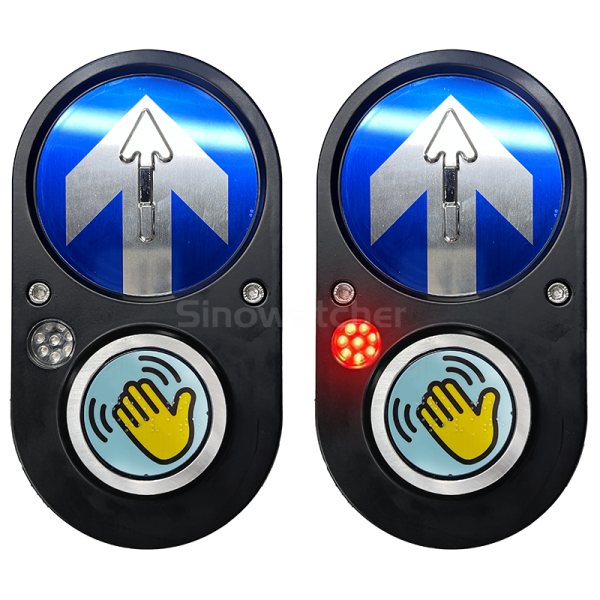
Contactless Push Button: A Modern Solution for Touch-Free Control
A contactless push button is a touch-free control device that allows users to activate a function without physically pressing a traditional button. Instead of requiring direct contact, it can detect a hand, finger, or other intended movement through technologies such as infrared sensing, proximity detection, or other electronic methods.
Contactless controls are becoming increasingly useful in public buildings, transportation facilities, commercial spaces, healthcare environments, offices, and smart infrastructure. They can help create a more convenient user experience while reducing the need for frequent contact with shared surfaces.
Traditional push buttons are simple and reliable, but they require users to touch the same surface repeatedly. In busy public environments, this can create cleaning and maintenance challenges. A contactless push button offers an alternative by allowing activation through a simple hand gesture or nearby movement.
List of H2 Headings
- What Is a Contactless Push Button?
- How Does a Contactless Push Button Work?
- Main Technologies Used in Contactless Buttons
- Key Components of a Touch-Free Button
- Benefits of Contactless Push Buttons
- Contactless Buttons in Public Buildings
- Applications in Transportation Systems
- Healthcare Applications
- Contactless Push Buttons for Accessibility
- Smart Door and Access Control
- Contactless Buttons and Hygiene
- Installation and Maintenance
- How to Choose a Contactless Push Button
- Factors Affecting Performance
- Future of Contactless Control Technology
- Conclusion
What Is a Contactless Push Button?
A contactless push button is an electronic control device that detects a user’s presence or hand movement without requiring physical contact.
Instead of pressing a mechanical switch, a user simply places a hand near the sensor. The device detects the movement and sends a signal to a connected system.
This technology can be used to activate doors, lights, pedestrian signals, elevators, automatic equipment, and other electronic functions.
Contactless buttons are particularly useful in locations where many people interact with the same control. Their touch-free operation can make everyday interactions more convenient.
How Does a Contactless Push Button Work?
A contactless push button usually contains a proximity sensor and electronic control circuitry.
When a person moves a hand toward the activation area, the sensor detects the movement. The control circuit evaluates the signal and determines whether the movement meets the activation conditions.
If the signal is recognized, the device sends an electrical output to the connected system.
For example, a contactless button installed near an automatic door can send a signal to the door controller. The door then performs the programmed action.
The sensing distance can vary according to the product design and installation environment.
Main Technologies Used in Contactless Buttons
Different technologies can be used to create touch-free controls.
Infrared sensors are commonly used because they can detect nearby objects without requiring physical contact.
Proximity sensors can detect the presence of a hand or object within a defined area.
Some systems use advanced optical sensing technologies to distinguish intentional gestures from background movement.
The selected technology depends on the application, detection range, environmental conditions, and required response time.
Manufacturers may also combine sensors with LEDs to provide visual feedback after activation.
Key Components of a Touch-Free Button
A contactless push button contains several important components.
The sensor detects a user’s hand or movement.
The control circuit processes the sensor signal and determines whether an activation should occur.
The output interface sends a signal to the connected device.
An indicator light may show that the system has detected an action.
The housing protects internal components from dust, moisture, and accidental damage.
Some models also include adjustable detection ranges or configuration options for specific installations.
Benefits of Contactless Push Buttons
Contactless buttons provide several advantages over traditional mechanical switches.
Touch-Free Operation
Users can activate the device without touching a shared surface.
Convenience
A simple hand movement can activate the system quickly.
Reduced Surface Contact
Because users do not need to physically press the button, fewer people interact directly with the control surface.
Modern Appearance
Contactless controls can provide a clean and contemporary appearance in public and commercial spaces.
Easy Integration
Many models can connect with existing electrical or automation systems.
Accessibility
Touch-free activation can be useful for people who have difficulty operating traditional mechanical buttons.
Contactless Buttons in Public Buildings
Public buildings often have high levels of daily foot traffic. Elevators, automatic doors, lighting controls, and other systems may be activated many times each day.
A contactless push button can provide an alternative to traditional controls in these environments.
For example, an automatic entrance door can use a proximity button positioned near the doorway. A person approaches, moves a hand near the sensor, and the door receives the activation signal.
The technology can also be used in office buildings, shopping centers, hotels, libraries, and government facilities.
Applications in Transportation Systems
Transportation facilities are another important application area.
Airports, railway stations, bus terminals, and parking facilities may have large numbers of people interacting with shared controls.
Contactless buttons can be installed for automatic doors, pedestrian crossings, ticketing equipment, and access systems where appropriate.
Touch-free activation can make these interactions more convenient for passengers while helping facility managers modernize infrastructure.
The equipment should be selected according to local standards and environmental requirements.
Healthcare Applications
Healthcare environments require careful attention to cleanliness and usability.
Contactless controls can be used for selected doors, equipment, lighting systems, and other applications where touch-free activation is practical.
In a busy healthcare facility, reducing unnecessary contact with shared control surfaces can be useful.
However, contactless technology should complement established cleaning procedures rather than replace them.
Hospitals and clinics should select equipment designed for their specific environmental requirements.
Contactless Push Buttons for Accessibility
Accessibility is an important consideration when designing public controls.
Traditional buttons may require users to apply a certain amount of force. A contactless system can eliminate the need for physical pressing.
The activation area can be positioned at a suitable height and designed with clear visual indicators.
Some systems can also provide audible or visual feedback after activation.
When installing contactless controls, designers should consider users with different physical, visual, and sensory needs.
Smart Door and Access Control
Automatic doors are one of the most common applications for contactless activation.
A contactless push button can be installed near an entrance or exit and connected to a door operator.
When a user approaches and activates the sensor, the door receives a signal and opens according to its programmed settings.
This can be particularly useful for commercial buildings, healthcare facilities, warehouses, and public entrances.
The system should include appropriate safety sensors to help prevent doors from closing when people are in the doorway.
Contactless Buttons and Hygiene
One of the main reasons businesses consider touch-free controls is the reduction of direct contact with shared surfaces.
Traditional buttons can be touched repeatedly by different users throughout the day. A contactless push button removes the need for this physical interaction.
This can make the control surface easier to manage in busy environments.
However, touch-free operation does not mean that the equipment never requires cleaning. Dust, fingerprints, and environmental contamination can still affect the housing and sensor area.
Regular cleaning and maintenance remain important.
Installation and Maintenance
Correct installation is essential for reliable contactless button performance.
The sensor should be positioned where users can easily detect the activation area. It should also be protected from unnecessary interference.
Installers should follow the manufacturer’s electrical and mounting instructions.
Maintenance usually includes cleaning the sensor surface, checking electrical connections, inspecting indicator lights, and testing the connected system.
If the device becomes less responsive, the detection area, power supply, wiring, or surrounding environment should be checked.
How to Choose a Contactless Push Button
Several factors should be considered when selecting a contactless push button.
First, identify the intended application. A button for an automatic door may have different requirements from one used for a pedestrian signal or industrial control.
Important factors include:
- Detection range
- Response time
- Mounting method
- Power requirements
- Output type
- Environmental protection
- Indicator options
- Accessibility
- Operating temperature
- Maintenance requirements
- Compatibility with existing equipment
The device should be tested with the connected system before large-scale installation.
Factors Affecting Performance
Environmental conditions can influence sensor performance.
Strong light, reflective surfaces, nearby moving objects, dust, moisture, and incorrect installation may affect certain sensor technologies.
The detection range should therefore be configured according to the location.
Clear activation indicators can also help users understand where to place their hands.
Regular testing can identify performance issues before they affect daily operation.
Future of Contactless Control Technology
Contactless controls are likely to become increasingly connected with smart building systems.
Future devices may combine proximity sensing with advanced gesture recognition, wireless connectivity, analytics, and centralized management.
Smart buildings could use contactless controls alongside automatic doors, lighting systems, elevators, security equipment, and building automation platforms.
As technology develops, designers may focus on creating smaller, more accurate, energy-efficient, and easier-to-install sensors.
Conclusion
A contactless push button provides a convenient alternative to traditional mechanical controls by allowing users to activate systems without physical contact. Its applications range from automatic doors and public facilities to transportation systems, healthcare environments, and smart buildings.
The technology can offer touch-free operation, accessibility benefits, modern design, and easy integration with many electronic systems.
Choosing the right device requires attention to detection technology, installation conditions, power requirements, compatibility, environmental protection, and maintenance.
With proper planning and installation, contactless push buttons can support more convenient, accessible, and modern control systems across a wide range of commercial and public environments.